
Answer in brief
An online store is ready to launch when customers can find the right product, understand its terms and complete the agreed ordering route, while your team can receive and handle the order. Test those steps together. A polished catalogue or an add-to-cart button alone does not prove the store is ready to sell.
Verified facts
- Source review
- Project screens and sources reviewed on 9 September 2026.
- Reader need
- online store launch checklist
1. Decide what counts as an order
Write down the intended journey before reviewing screens: browse, compare, choose a variant, add to cart and either pay or request a quotation. Equipment sales may require a consultation; other stores need immediate payment. Specify which route the first release supports, who receives the request and what the customer sees next. Do not silently treat a quotation request as a paid order.
2. Prepare a catalogue people can navigate
Group products by distinctions customers actually use. Give each category a clear purpose and link it to its product pages. Google recommends a navigable category-to-product structure; internal search alone is not a substitute. For each product, assign a content owner to confirm the name, images, variants, availability, price and fulfilment information before publication.
3. CONCEPT example: the INNOVATIONE catalogue
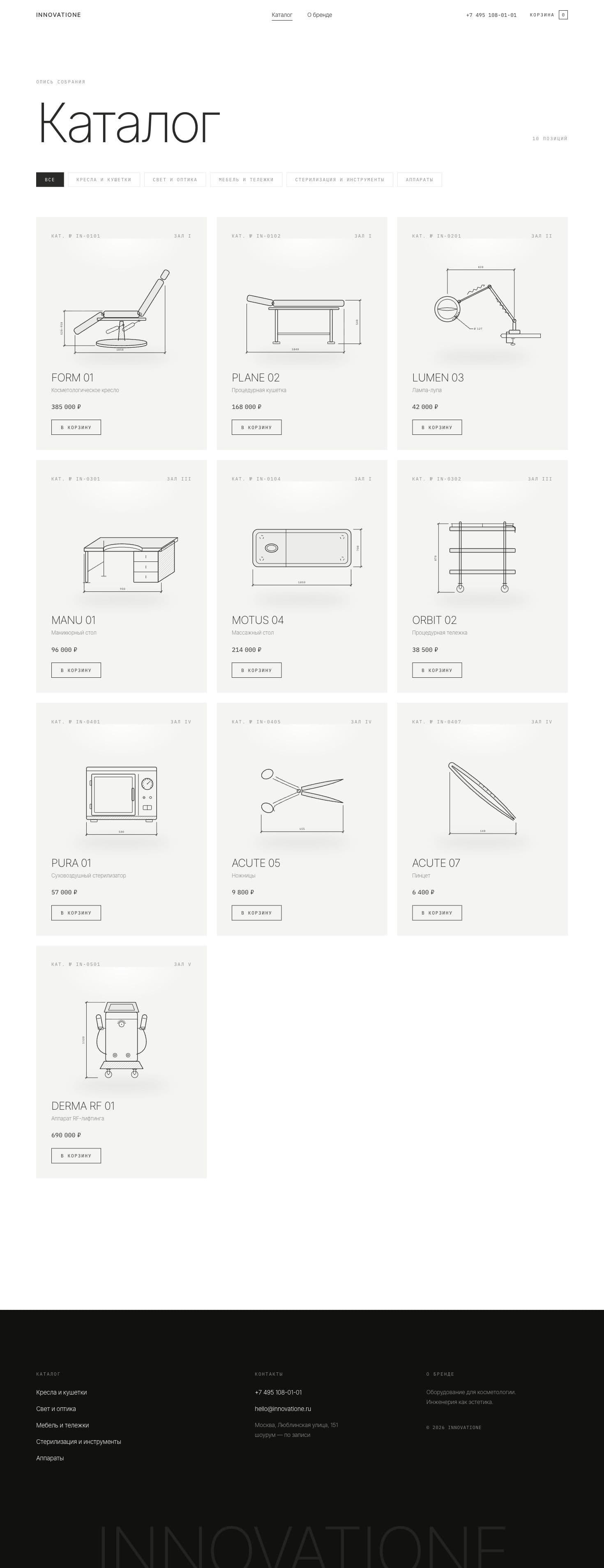
INNOVATIONE is an authored CONCEPT for a cosmetology-equipment store, not a commissioned client shop. Its captured catalogue contains ten demonstration items in five groups, category filters, technical illustrations and cart actions. The exhibition-like presentation is useful for discussing catalogue structure. All products, prices and contact details shown are demo content, not a current offer from VITON13.
4. Separate the prototype from production readiness
The INNOVATIONE project note describes HTML, CSS, JavaScript and SVG work. The screens and accessible prototype support an interface example; they do not verify a production payment connection, live inventory, shipping or completed sales. In your own brief, mark each element as designed, implemented, connected or tested. That distinction makes outstanding work visible before a launch date is agreed.
5. Run a small but complete acceptance test
Choose one normal product, one variant and one unavailable item. On phone and desktop, record the starting state, action, expected result and actual result. Test filters with no matches, quantity changes, removal from the cart, invalid customer details and an interrupted payment or request. Use the payment provider’s test environment where applicable. Confirm success and failure messages, then inspect the order or enquiry received by the team.
7. Assign the work after the order arrives
A checkout confirmation is only one handoff. Name the person or system responsible for accepting an order, checking stock, arranging fulfilment and answering the customer. Define how cancellations and failed requests are handled. Before launch, give the responsible team the agreed access, editing instructions, integration status and a procedure for reporting and retesting faults.
8. Make a release decision from evidence
Keep a short launch record with the tested device, route, result, remaining issue and responsible person. Block release when the agreed ordering path fails or essential product information is wrong. Keep cosmetic follow-ups separate from operational failures. After release, review actual search visibility and order handling; screenshots and publication alone establish neither rankings nor conversion gains.
Practical checklist
- Confirm whether the customer pays online or requests a quotation.
- Check category links and approved product information.
- Test cart, errors and successful order delivery on phone and desktop.
- Label unconnected integrations and assign their verification.
- Hand over access, order handling and a retest list.
Questions and answers
What must work before an online store launches?
Product discovery, trustworthy product details and the agreed ordering route must work together. The team must also receive and process the resulting order or request.
Does every online store need immediate payment?
No. A quotation or consultation route can suit some products, but it must be presented clearly and must reach the responsible team.
What does the INNOVATIONE example demonstrate?
An authored concept catalogue with demonstration items, filters, technical imagery and cart actions. It does not demonstrate production payments, real stock or sales results.
What affects ecommerce development cost?
Catalogue and import scope, page types, languages, integrations, content work and support. Compare the same deliverables rather than only the headline price.
How do I test without placing real paid orders?
Use a test environment and provider-supported test payments where available. Check both successful and interrupted paths, and confirm the resulting records before authorising live operation.