
Answer in brief
A portfolio website is an address of your own where a client can check your work before hiring you. Each work needs its own page with the task, your part, the result and its source, plus an honest label: client, own product or concept. Around that you need a simple structure, fast pages whose text a crawler can read, and real language versions if your clients read several languages.
What a portfolio website does that a social profile cannot
Before a client hires a designer, a photographer or a small studio, they usually look the person up. A portfolio website answers that search: your work, your part in it and a way to reach you, at an address you own. A social profile shows similar pictures, but in the order and format the platform chooses. A PDF deck sent as an attachment can look superb, yet it has no public address at all, and it ages the day after you send it.
Google’s SEO Starter Guide says the search engine primarily finds pages through links from pages it has already crawled, and that there is no guarantee any particular site will be added to its index. So a site will not bring clients by itself. It gives every link you share, from an email signature to a marketplace profile, one place to land. The pages there are yours to control.
What a believable work page in a portfolio contains
The unit of a portfolio is the work page, not the image. A good one answers four questions: what the task was, what you personally did, what came out of it and how the reader can check that. A caption names a logo; a case shows the brief, the routes offered and the one chosen. In a team project, name your part plainly: art direction, layout, retouching or code.
Results need a period and a source, or an experienced buyer reads them as decoration. Google’s guidance on helpful, reliable, people-first content offers a test that works outside search too. It asks whether a page presents information in a way that makes you want to trust it, such as clear sourcing. It also asks whether it is self-evident who made the content and how it was produced.
Label every work for what it is. A client commission, your own product and a concept made to show range are all legitimate, but they prove different things, and blurring them costs trust. Ask each client in writing whether you may show the work and its figures, and keep the answer. A short set of labelled, well-explained works tells a buyer more than a wall of thumbnails.
Pages and language versions of a portfolio site
Most portfolio websites need the same few pages: a home page that says who you are in one screen, a work index with filters, a page per work, an about page, a page on the jobs you take and a contact page. Filters matter, because a client looking for packaging will not scroll past wedding photography. Give each work an address with words in it. Google’s starter guide prefers such URLs to ones made of random identifiers.
If clients read several languages, give each language its own version of every page rather than a translate button. Google’s guide to localised versions asks for hreflang annotations in which each version lists itself and all the others; if two pages do not point to each other, the tags are ignored. The x-default value names the fallback for visitors whose language matches none of them. Yandex’s webmaster help describes the same link elements and says Yandex no longer supports a Sitemap file for language versions, so marking them in each page’s head suits both engines.
Technical basics a portfolio template may hide from you
Portfolios are heavy by nature: large images, video and motion. The web.dev guide defines Largest Contentful Paint as the render time of the largest image, text block or video visible in the viewport. Its target is 2.5 seconds or less at the 75th percentile of page loads, on mobile and desktop separately. The other Core Web Vitals are Interaction to Next Paint, at 200 milliseconds or less, and Cumulative Layout Shift, at 0.1 or less.
Text should be readable without running scripts. Google’s JavaScript SEO basics call server-side or pre-rendering still a great idea, since it makes a site faster for users and crawlers and not all bots can run JavaScript. Google indexes the mobile version of a site, crawled with a smartphone agent, so the phone layout is the main one. The W3C accessibility tutorials ask for text alternatives on informative images and an empty alt on decorative ones.
A canonical link tells Google which address to show when pages are similar; its documentation calls rel=canonical a strong signal, but Google still decides what counts as a duplicate. A sitemap lists the pages you care about, and Google’s sitemap documentation says it does not guarantee they will be crawled and indexed. Motion should respect the visitor. MDN describes the prefers-reduced-motion media feature, which detects a device setting to minimise non-essential motion, since such animation can trigger discomfort for people with vestibular motion disorders.
The tarasovvitalii.com case: a founder’s portfolio in four languages
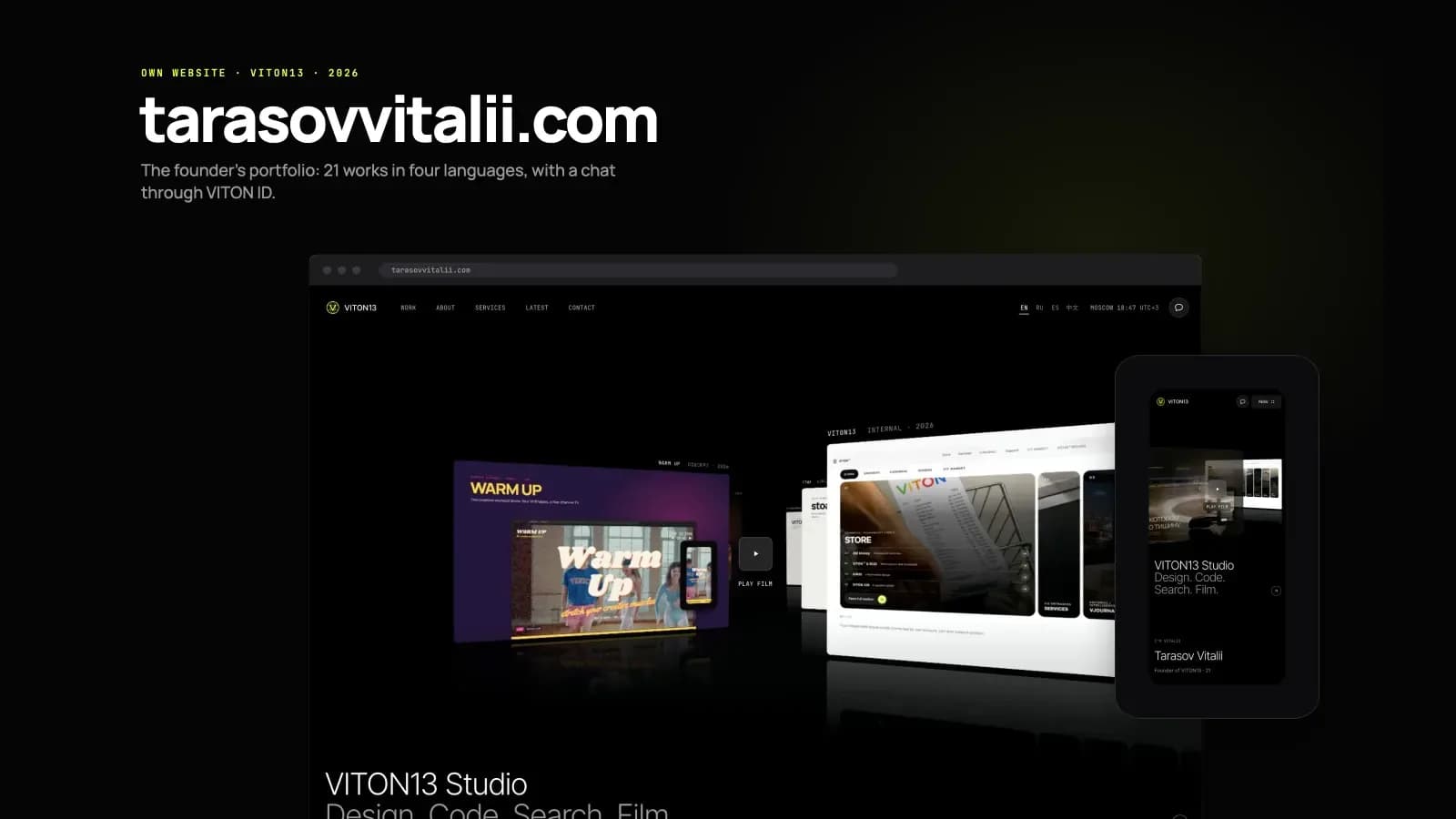
All of this can be seen on one real site. tarasovvitalii.com is the personal website of Vitalii Tarasov, the founder of VITON13, designed and built by VITON13 Studio for itself: the studio’s own product, not a client commission. It has been live since 23 September 2026 in English, Russian, Spanish and Chinese. It shows 21 works, each labelled: one client site, ten of the studio’s own products and ten concepts. Every case page carries its figures with sources and a “What this does not prove” block.
Each edition has eight kinds of page: home, the work index, a page for each work, about, services, latest, contact and messages, plus a 404. That makes 116 HTML files; the 108 pages meant for search are listed in the sitemap, while messages and the 404 stay out of it. A visitor who likes a case can write from the page after signing in with VITON ID, or leave an email through a guest form without an account.
How the founder’s portfolio site was built and measured
The site is plain HTML, CSS and JavaScript produced by a static generator written in Node. Every page is rendered in advance for each language, so a crawler reads the full text without running scripts. Motion switches off when the visitor’s system asks for reduced motion. On 24 September 2026 Lighthouse 13 gave the home page 99 for performance and 100 for accessibility, best practices and SEO, on mobile and desktop. On mobile it loaded in 25 requests and 1.6 MB, with LCP at 2.0 seconds, no blocking time and no layout shift.
The same day all 108 sitemap pages were rendered in Chrome at 390 px. Each had one H1, a self-referencing canonical URL, hreflang to the four editions and x-default, Open Graph and JSON-LD. All 872 images carried an alt attribute, empty on thumbnails shown beside their titles; no page scrolled sideways, and 182 internal link targets returned no errors. Some items were only partly in place: 107 of 108 titles are unique, and a Chinese title that repeats the English one is on the list to fix.
What the tarasovvitalii.com case does not prove
The case page states its own limits. This is the founder’s own site, built by the studio for itself, so it shows how the studio works as its own client, not how it handles someone else’s brief. It went live on 23 September 2026, so there is no traffic, ranking or enquiry data yet, and the case claims none. The search figures inside the showreel belong to another case, SB Excursions, not to this site.
The Lighthouse scores are lab tests of the home page on one day; a second desktop run minutes later gave 95 for performance. Chrome’s documentation on Lighthouse performance scoring says much of such variability is not due to Lighthouse but to changing conditions, such as traffic routing, browser extensions and antivirus software. web.dev adds that lab measurement is no substitute for field measurement. Its LCP target refers to real page loads, which one lab run cannot show.
A page in the sitemap is an invitation to crawl, not proof that it is indexed. Google’s starter guide points to the URL Inspection Tool in Search Console for seeing a page as Google does, and warns that some changes take effect in a few hours while others could take several months. Access from mainland China was not tested, and the chat depends on Google’s Firebase services. Your own portfolio deserves the same honesty about every figure it shows.
Preparing a portfolio website: template or custom build
Start with the material, not the design. Choose 8 to 20 works you are allowed to show, write down your role in each and get permission in writing where you can. Collect original files, photos and video at full quality, and every figure with its period and source. If you work in several languages, remember that a portfolio website in two languages means two sets of copy, not one set and a button.
A builder template is enough for a dozen works in one language, if its layouts suit them and you will check speed, alt texts and the phone version yourself. A custom build makes sense when the work needs its own presentation, when several languages need proper hreflang, or when the site must do more than display pictures, such as a chat or an account. VITON13 Studio designs and builds such sites. The guide linked below compares the platforms before you decide.
Practical checklist
- Pick 8 to 20 works you may show and note your exact role next to each one.
- Give every work a visible label: client project, own product or concept.
- Put the task, the result and the source of each figure on every work page.
- Write real texts for each language and link the versions with hreflang.
- Open the home page and one work page on a phone and in Lighthouse before launch.
Questions and answers
How many works should a portfolio website show at launch?
There is no fixed number. A set of works you can explain fully, with your role and a result, serves a buyer better than dozens of thumbnails. Somewhere between eight and twenty is a practical start, and you can add more as new cases are cleared for publication.
Can a designer rely on a social profile instead of a portfolio site?
A profile helps people discover you, but the platform sets the order, the format and the neighbours of your work. A site of your own keeps every case on a stable address with room for the task, the role and the evidence, and the profile can point to it.
Should concept work go into a portfolio, and how do I mark it?
Yes, if it shows a skill a client may need. Mark it as a concept on the index and on its own page, and say why it was made. Trouble starts only when a concept is presented as a commission, because a buyer who finds out stops trusting the rest.
Does a small portfolio site need a sitemap file at all?
Google’s sitemap documentation says a site of about 500 pages or fewer that is comprehensively linked internally may not need one. A sitemap still does no harm, and with several language versions it is a handy list of the pages you want crawled.
Will a perfect Lighthouse score make my portfolio rank higher?
Not by itself. Lighthouse runs a lab test of one page at one moment, and Google’s starter guide says there are no secrets that automatically rank a site first. A fast page helps visitors stay; the works, the texts and the links to your site do the rest.