
Answer in brief
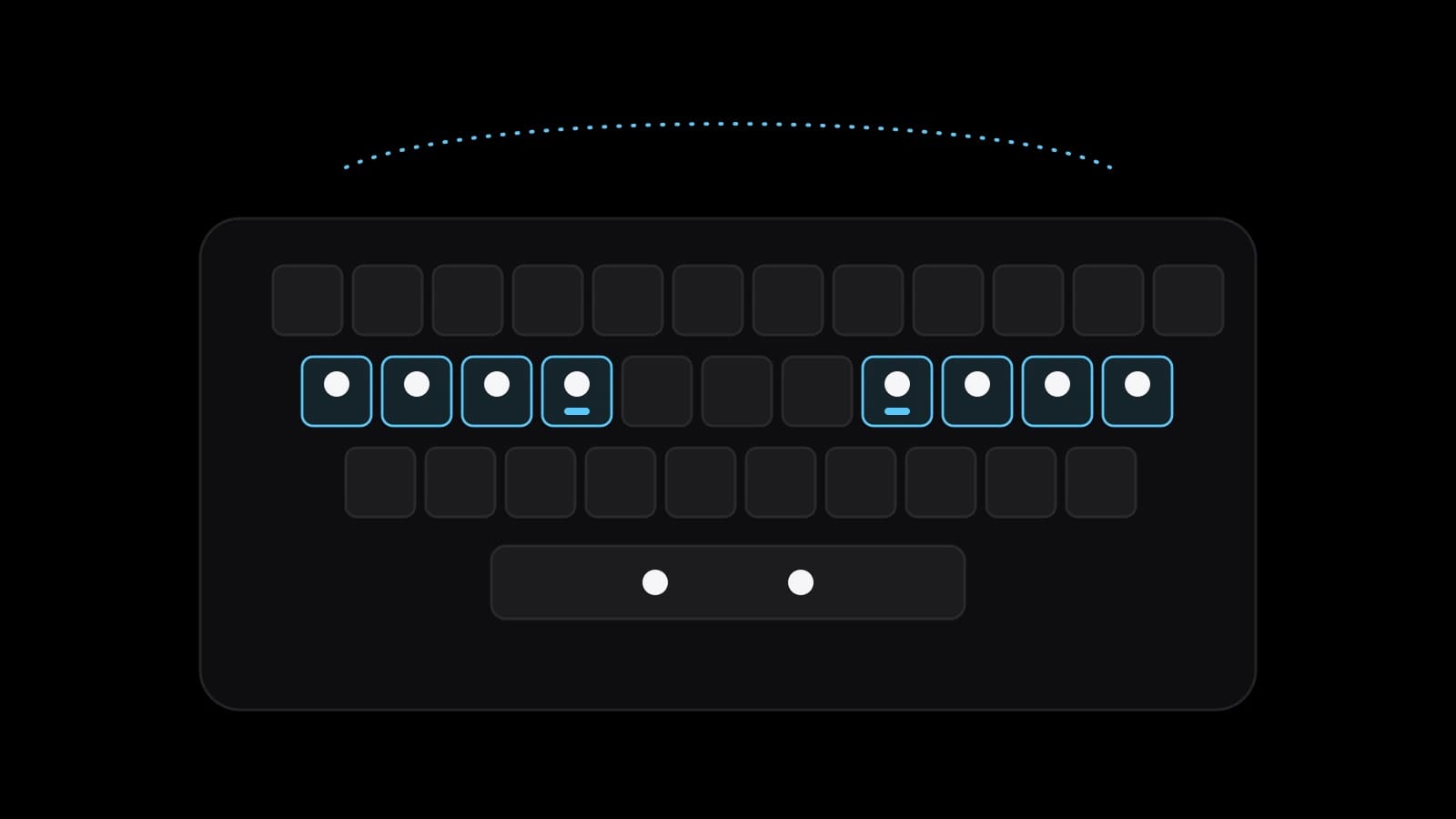
Touch typing is typing without looking at the keys: eight fingers rest on the home row, the index fingers find the marked keys F and J (the same two keys on the Russian layout), and each finger reaches only for its own keys. It is learned row by row, then on words and sentences, with the eyes on the screen, accuracy before speed and short daily sessions.
Touch typing: eight fingers that find the keys by feel
Touch typing is typing without using your eyes to find the keys. Wikipedia’s article on the method says the typist knows where each key is through muscle memory. In the usual sense the term means one technique: eight fingers rest on the middle row of the keyboard and reach out from there, while the thumbs share the space bar.
The middle row is the home row, because the fingers return to it after every reach. On English QWERTY the left hand rests on A, S, D and F, the right on J, K, L and the semicolon. Most modern keyboards, Wikipedia notes, have a raised dot or bar on F and J for the index fingers. Russian Wikipedia gives the Russian version: home keys ФЫВА and ОЛДЖ, with the bumps on А and О.
The technique is older than computers. English Wikipedia says that Frank E. McGurrin, a court stenographer from Salt Lake City, reportedly invented home-row typing in 1888. That July he decisively beat Louis Traub, who used an eight-finger method, at a typing contest in Cincinnati. Whether he was really the first is disputed.
What typing without looking changes in study and work
Touch typing first changes where attention goes. Wikipedia counts it among the advantages: the eyes no longer travel between the keyboard, hidden under the fingers, and the screen. A student taking notes keeps listening, and an office worker sees a typo the moment it appears. The same article says this also helps posture and reduces neck strain.
The method does not promise everything. In 2016 researchers at Aalto University in Finland recorded 30 typists with 12 high-speed infrared cameras: course-trained people were on average about as fast and accurate as self-taught ones using around six fingers. Among the factors that predicted speed were hands kept in one position and the same finger for each letter, two habits the home-row method builds on purpose. Untrained typists, though, spent about twice as long looking at their fingers, which can slow complex editing.
Learning touch typing step by step, one row at a time
Start with the hands, not the letters. Put the index fingers on the two marked keys and let the other fingers fall on their neighbours in the row. Each finger owns a slanted column above and below its home key, and the index fingers also cover the column beside them. Russian Wikipedia makes a useful point: letter positions are remembered easily, and the real work is tying a finger movement to each letter.
So practice follows a fixed order. Wikipedia describes the usual route of typing tutors: the home row first, then the other two rows. In practice: the middle keys of the home row first, then the whole row, the top row and the bottom row. A new row joins only once the previous one runs without thinking.
Words come only after the rows. Start with short real words made of keys you know, then words that mix rows, then whole sentences with capitals and punctuation, since Shift and the full stop are reaches of their own, mostly for the little fingers. Wikipedia notes that typists who use fewer fingers commonly leave out the little finger as the weakest, and sentences expose that gap at once.
Eyes on the screen, accuracy first and short daily sessions
The rule that separates the method from an imitation is simple: do not look down. Russian Wikipedia reports that most authors of typing manuals insist on a strict ban on glancing at the keys. When a letter will not come, they suggest a picture of the layout on the wall or on the screen. Blank keys, or letters taped over, make the ban easier to keep.
Accuracy comes before speed. Every wrong letter costs a correction, which takes longer than the keystroke it replaces. Wikipedia adds that overall speed is usually set by how slowly the weakest keys are typed, not by how fast the rest go. So type slowly enough to keep errors rare, and give the letters that make you hesitate a short drill of their own.
Session length matters too. Wikipedia’s article on distributed practice describes a 1978 study in which Alan Baddeley and D. J. A. Longman taught postmen to type, comparing long sessions with shorter ones spread over more days. Those in short sessions over many days typed more accurately and faster in the end, though the crowded schedule looked more efficient. At home that means a short block every day, not a weekend marathon.
Habits that keep a learner stuck in hunt and peck
The strongest pull back is the old method itself. Wikipedia points out that people who already type with two fingers find the switch particularly hard: at first they are far slower by touch, so the effort seems not worth it. Such an early drop in speed is common, the same article says, and with consistent practice lasts no more than a few months. Meanwhile, keep one low-stakes daily task, such as notes, for touch only.
Smaller habits are just as stubborn. Moving the whole hand to a key instead of stretching one finger blurs the map the fingers are building. So does pressing one letter with different fingers on different days, since the Aalto team counted consistency among the marks of fast typists. Russian Wikipedia adds that people who learned only through everyday work often use few fingers and move their hands more, which can limit speed and accuracy.
Posture and comfort at the keyboard during practice
Eight fingers rest easily on one row only at a well-set desk. The computer workstations guide of OSHA, the US workplace safety agency, describes a neutral posture: elbows about level with the keyboard and hanging at the sides, relaxed shoulders, wrists not bent up, down or sideways. The keyboard sits directly in front, close enough for the forearms to stay roughly parallel to the floor, and the monitor at a height where you look straight ahead.
OSHA warns that a keyboard set too low bends the wrists up, one set too high lifts the shoulders, and the feet at the back should not be used if they increase the bend. A proficient typist, the guide notes, can easily make more than 18,000 keystrokes an hour. It advises a five-minute break from computer tasks every hour: look away, stretch, get up or walk. If tingling, numbness or pain appear, fix the desk and see a doctor if they persist.
Typing in two layouts, Russian and English, without mixing them up
Many people type in two alphabets every day, and Russian with English is the classic pair. French speakers meet a similar question, since French-speaking countries use AZERTY and English-speaking ones QWERTY, as Wikipedia notes. The good news is physical: the bumps under the index fingers carry F and J on QWERTY and А and О on ЙЦУКЕН, so the hands sit in the same place. Bring one layout to a steady level first, then add the second in its own practice block.
Confusion comes from the keys around the letters. Russian Wikipedia notes that on Apple’s Russian layout, unlike the Windows one, the full stop and comma sit on the number row with Shift, and warns that moving between two layouts of one language takes considerable relearning. Keep one variant per language on every computer. Microsoft’s support page says the Windows logo key with the Spacebar cycles through installed layouts, and Apple’s Mac guide gives Control with the Space bar for the last input source used.
A week of touch typing practice and what the school trainer adds
Most of this can start alone this week: touch typing needs only a keyboard and a quarter of an hour a day. Set up the desk, find the marked keys with your eyes closed and type the home row until the fingers stop wandering. Add the top row only when the home row feels calm. At the end of the week, type a paragraph of real text by touch and count errors, not seconds.
A structured course adds a fixed order and honest feedback. The free typing trainer of VITON13 SCHOOL has eight short lessons in this order: the home keys, the centre of the home row, the whole home row, the centre of the top row, the whole top row, the bottom row, words and sentences. It works on Russian ЙЦУКЕН, English and Spanish QWERTY and French AZERTY. A wrong letter is not accepted, so you find the right key and go on, and a lesson is passed at 94 percent accuracy or more.
A Fingers hint colours the keyboard by finger, and if another layout is on, the trainer says which one to switch to. The trainer is free, needs no registration, keeps best results and passed lessons in your browser and counts characters and words per minute, accuracy and errors, with a speed test of 30, 60 or 120 seconds. Its advice is 15 to 20 minutes a day, the one-minute test once a week and a physical keyboard for practice. If English or code comes next, the school’s courses continue from there.
Practical checklist
- Adjust the chair until your elbows are level with the keyboard and your wrists stay straight while typing.
- Find F and J, or А and О on ЙЦУКЕН, with your eyes closed and rest all eight fingers on the home row.
- Practise one row at a time and add the next row only when the current one no longer needs thought.
- Keep a picture of the layout on the screen and do not look down at your hands, even when a letter will not come.
- Set aside 15 to 20 minutes a day for practice and take a one-minute speed test once a week.
Questions and answers
How long does it take to learn touch typing?
There is no single honest number. Russian Wikipedia says that in favourable cases daily half-hour sessions can bring the skill in less than a month, and that it depends strongly on the person. English Wikipedia adds that the early fall in speed usually passes within a few months of consistent practice.
Do you really need all ten fingers to type fast?
Not strictly. In the Aalto University study, self-taught typists using about six fingers matched course-trained ones on average. A steady hand position and the same finger for each letter were among the things that mattered, and the home-row method trains exactly that from the first lesson.
Is it worth switching if I already type quickly with two fingers?
It usually is, but expect to be slower for a while, which is why many people give up. The Aalto researchers found that untrained typists looked at their fingers about twice as long as trained ones, and that costs time in editing and in any work where the eyes belong on the text.
Which keys carry the bumps on a Russian keyboard?
The letters А and О. They sit on the same physical keys as F and J on an English keyboard, under the two index fingers, so the starting position of the hands is identical in both layouts and only the letters assigned to the fingers differ.
Can I learn ten-finger typing on a laptop or a phone?
A laptop has a physical keyboard, so it works, ideally at a table with the screen raised or an external keyboard. OSHA notes that smaller keyboards such as those on laptops may contribute to stressful postures. A phone screen does not train the ten-finger movements, though it is fine for a quick speed test.