
Answer in brief
A WMS records goods coming in and going out and, unlike accounting software, knows the exact bin of every unit, plans putaway, builds pick routes and confirms each step with a barcode scan. It is worth it when stock sits in many places, several people pick at once and wrong items or search time cost money; a small store with one room of shelves may still manage on a spreadsheet.
What a warehouse management system adds to stock records
A warehouse management system answers a question that stock records leave open: not how many units you own, but where each one sits and who moved it. Wikipedia’s article calls a WMS a set of policies and processes that organise the work of a warehouse or distribution centre. Its core job is recording inventory in and out. Software built for it can also track the precise location of stock, use space better and coordinate tasks.
An accounting program or an ERP stock module may show forty desk lamps in stock, yet not tell a picker which of three racks holds them. In Wikipedia’s comparison, inventory tools lean towards material costs and reorder timing, a WMS towards moving goods inside the building, and ERP warehouse modules lack the sophistication of advanced warehouse systems. The Russian-language Wikipedia adds that systems without location-based storage only record goods in and out and are often called warehouse accounting programs. Accounting says what you own; a WMS says where it is and how fast it can leave.
Bin addresses and putaway rules: the grid a WMS stands on
Location-based storage starts with one rule: every place where goods can sit gets an address, usually aisle, rack, level and position, printed on a label at the bin. A stock record then stops being a single number and becomes a list of places with quantities. A receiver can be told where a pallet goes, and a picker is sent to a place rather than to a product name. Without that grid, software can only repeat what people on the floor already remember.
The Russian Wikipedia article says that systems built on bin addresses suit large warehouses with high turnover and plan placement around the properties of the goods and of the storage places. In daily work those properties become putaway rules. Heavy items go low, goods picked every hour go near packing, slow sellers go higher, and anything that needs cold goes only to the cold zone. The rule is written once and applied to every receipt, so the decision no longer depends on who is on shift.
Order picking in a WMS: lists, routes, batches and scans
Wikipedia’s article on order picking defines it as collecting articles in a specified quantity before shipment to fulfil customer orders. In zone picking each picker stays in one zone, in batch picking one picker collects for several orders at once, and wave picking combines the two. A pick list in the order the customer typed it sends a picker back and forth; sorted by bin address, the same list loses much of the zigzag. The article notes that WMS products create pick paths to minimise the travel distance of an order selector.
Each step is confirmed by a scan, which works only if every item carries a number the system knows. GS1 US describes the GTIN, the Global Trade Item Number, as a GS1 identification key used to identify a trade item. The GTIN is the data, and the barcode is its physical carrier. The Russian Wikipedia adds the view from the floor: incoming goods carry barcodes, and data collection terminals read them during counts.
Pallet labels, cycle counts and the systems a WMS talks to
Pallets and parcels need a number of their own. GS1 Sweden explains that this is the SSCC, the Serial Shipping Container Code: 18 digits built from a GS1 Company Prefix, a sequence number and a check digit, which identifies logistic units such as pallets and parcels on their way from production to the end customer. Counting keeps all these numbers honest. Wikipedia describes a cycle count as counting a small, specific subset of inventory in a regularly repeated sequence, less disruptive than a full physical inventory that halts operations.
A warehouse management system rarely works alone. Orders come from the online store or a marketplace, accounting needs to know what was received and shipped, and carriers need labels and pickup times; each link is an integration to build, test and maintain. Before changing software, write down your own numbers: orders per day, minutes from print to packing, wrong items shipped and how far counts drift from the records. Those figures are the only honest baseline for judging any system later.
RACKLIGHT, a concept WMS where the warehouse is the screen
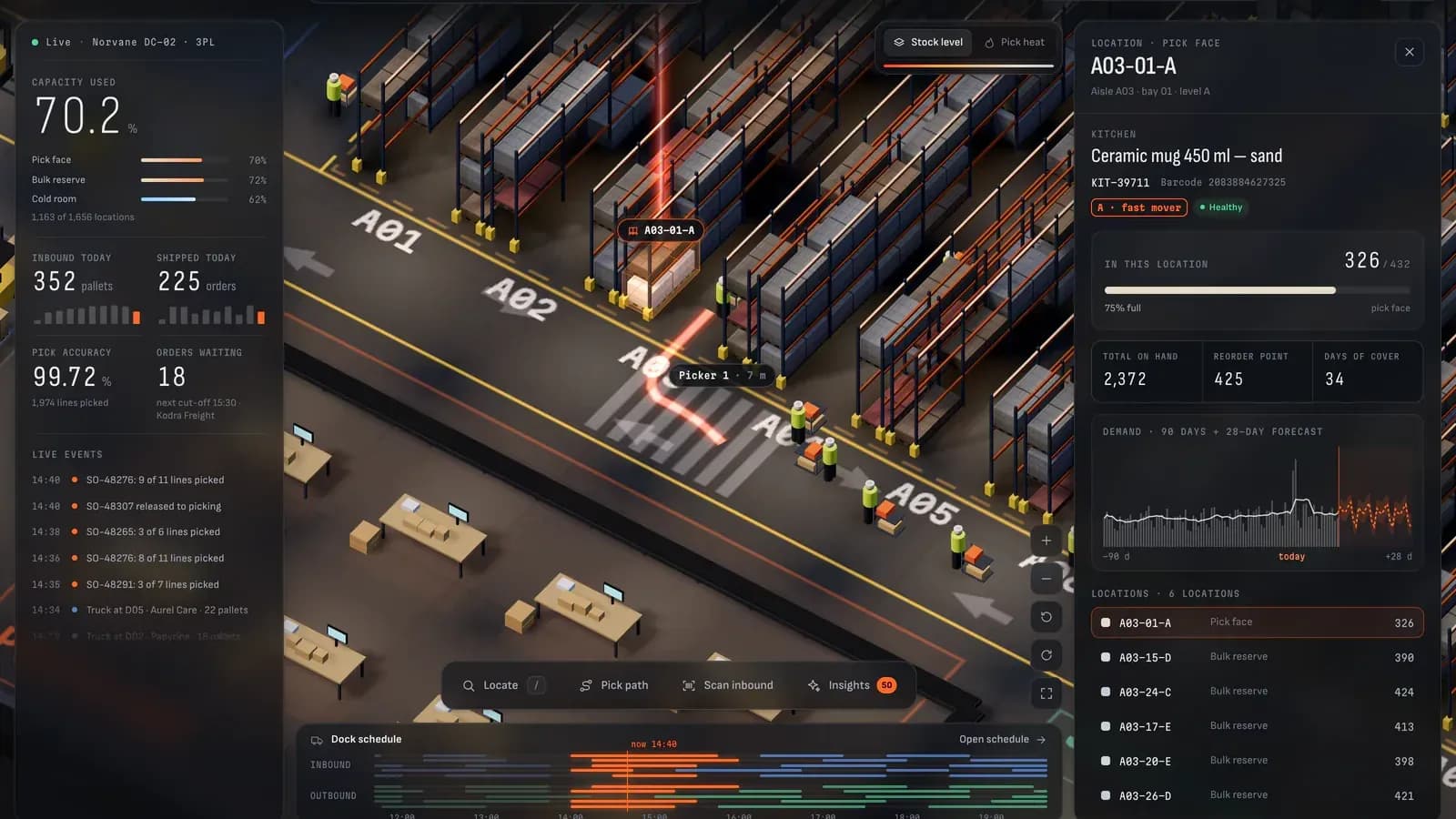
These ideas meet in RACKLIGHT, a concept VITON13 Studio built on its own initiative to show range: not a client project, not a launched product, and running on generated data. It is a WMS for Norvane DC-02, a third-party-logistics warehouse that does not exist, with 400 products, 38 outbound orders a day, five inbound and five outbound dock doors and a cold room. The company, its customers, carriers, suppliers and every number are fictional, and a fixed badge on screen says so. The brief was to make the warehouse itself the interface without turning it into a 3D showpiece.
The 108 by 80 metre building is drawn in three.js with an isometric camera: 12 main aisles, 4 aisles in a glass cold room and 10 dock doors. Its 1,656 bin locations appear as live 3D pallets coloured by stock or by pick frequency, and nine pickers and five forklifts move along the aisles. Search flies the camera to any bin, lights it with a beam and draws a path from the nearest picker. The inbound scan applies a putaway rule by velocity: fast movers nearest packing, slow movers on the upper reserve levels, chilled goods in the cold room.
Pick-path optimiser and demo AI inside the RACKLIGHT concept
The pick-path optimiser compares an order sheet’s sequence with a route built by nearest neighbour and 2-opt on shortest aisle distances. Run on the 1,140 orders the demo generates over 30 days, the optimised route was a median 32% shorter than walking the sheet line by line, and the order shown in the screens drops from 409 m to 211 m. Against a sheet simply sorted by location code, the median gain is about 9%. The case calls that the fairer comparison for a warehouse that already sorts its pick lists.
Inventory intelligence is labelled demo AI, and the interface explains it: rules and statistics that run in the browser, not a language model. Each SKU has 90 days of generated demand with weekly seasonality; the forecast uses seasonal indices from the last eight weeks and a damped linear trend, and safety stock at z = 1.65 sets the reorder point. Four lists flag low stock, overstock, dead stock and slotting swaps. Around the scene sit a dashboard and inventory, orders and dock views, in English and Russian.
What a concept on generated data cannot prove about a WMS
RACKLIGHT proves less than its screens suggest, and the case says so. Norvane DC-02, its customers, carriers, suppliers, products and every number are fictional and generated in the browser: there are no users, no clients, no warehouse and no revenue behind it, and it proves nothing about adoption or savings in a real operation. The demo AI has never seen real demand. Nothing connects to a real WMS, ERP, barcode scanner or dock system, the layout is hard-coded rather than imported from drawings, and routing ignores congestion, carts and batch picking. The 32% is a result on generated orders, not on a working floor.
A real implementation adds the hard part. It has to exchange orders and stock with the store, the marketplace and accounting, send labels and pickup times to carriers, and make scanners, label printers and Wi-Fi work in every aisle. Staff need training, and the switch from the old process needs a cut-over plan with a full count, a date and a fallback. Wikipedia’s WMS article notes that customising these systems can be costly and that more complex software can be more difficult for employees to use.
Preparing a warehouse for a WMS: data, layout and the build-or-buy choice
The preparation is the same whatever you choose. Draw the layout and list every bin with its address, size and the goods it can hold. Clean the product master data: one record per item with dimensions, weight, unit of measure and the GTIN from the label. Describe the order profile, from orders per day and lines per order to peak days, and list the software you already run and who looks after each piece of it.
A ready-made warehouse management system covers the standard flow of receiving, putaway, picking, packing and counts, and Wikipedia notes that perpetual licences for such software are gradually giving way to hosted subscriptions. It fits when your processes look like those of most warehouses. Custom development makes sense when the process is unusual, when a ready-made tool would need heavy customisation, or when what is missing is an interface on top of systems you keep. VITON13 Studio designs and builds logistics platforms of this kind; the guides below explain what drives the cost of API integration and SaaS development.
Practical checklist
- List every storage location with an address, a size and the type of goods it may hold.
- Clean the product master data: one record per item with dimensions, weight and GTIN.
- Measure orders per day, minutes per order, wrong items and count gaps before changing anything.
- Name every system the WMS must exchange data with: store, marketplace, accounting and carriers.
- Decide which part of your warehouse flow is unusual before comparing ready-made and custom options.
Questions and answers
Is a WMS the same thing as warehouse accounting software?
No. Accounting software and ERP stock modules record what the company owns and what it is worth. A WMS adds the place: the bin of every unit, the task that moved it and the person or scanner that confirmed the step. Where both run, accounting keeps the money side and the WMS keeps the floor.
Does a small online store with one stockroom need a WMS?
Often not at first; the English Wikipedia article mentions that smaller facilities still use spreadsheets or paper. The signs that a sheet is no longer enough are practical: goods sit in many places, several people pick at the same time, wrong items go out, or looking for stock eats into the working day.
What is the difference between a GTIN and an SSCC on a warehouse label?
The GTIN identifies a trade item, the product you sell. The SSCC identifies one logistic unit, a specific pallet or parcel, with an 18-digit serial number. A warehouse uses the first to check that the right product was taken and the second to follow the unit as it moves.
Can a WMS work without barcode scanners on the floor?
It can run on printed tasks and manual confirmation, and the Russian Wikipedia article mentions receiving with either radio terminals or paper documents. Without scanning, though, every confirmation depends on a person ticking the right line, which removes much of the check that bin addresses and labels exist to give.
Can the RACKLIGHT concept be deployed in a real warehouse?
No. RACKLIGHT is a concept built to show range, and it runs on generated data for a warehouse that does not exist. It has no connection to real scanners, ERP or dock systems. It shows interface ideas and working rules; a real project would start from your own layout, data and integrations.