
Answer in brief
A client booking program gives clients a page to pick a service, a specialist and a time without calling, and gives the business a calendar that enforces durations, buffers, staff hours and a cancellation policy, sends reminders and keeps a card for every client. Judge it by the rules it can enforce rather than by its looks, and find out where it stores client data.
What appointment scheduling software does on both sides
Anyone who works by appointment sooner or later outgrows the paper diary and the chat full of booking requests. Wikipedia describes appointment scheduling software as tools that let businesses and professionals manage appointments and bookings. Its feature list maps the field well: booking online around the clock, an integrated CRM, booking statistics, online payments, reminders by email or SMS, and booking of rooms or equipment.
The program has two faces. The client sees a page to choose a service, a specialist and a time, leave a name and a phone number and get a confirmation without calling. The business sees a back office: a calendar with a column per specialist, services with their durations, hours and breaks, and a card for every client. Judge both faces before you choose, not one.
Clients need not book only on your own site. Google Business Profile Help describes adding bookings to a profile through a provider found via Reserve with Google, or adding your own link, and says providers show up within a week. Yandex Business help describes a booking button for certain types of activity, connected through Yandex’s booking API or a partner service, which appears within 10 days. These are platform rules, and they change.
Must-have booking rules and the extras that can wait
Before comparing tools, write down the rules your day runs on: the program has to enforce them, not just display them. Every service needs a duration, and some need a buffer afterwards to clean a room. Each specialist needs weekly hours and breaks, and some services need a particular room or machine. A minimum notice period, a booking horizon and a cancellation policy complete the list.
Then come extras that rarely decide the choice: a waitlist, deposits, reports on no-shows and on how full each day is, a suggestion of the client’s usual time. Each is worth having when you can name the problem it solves. A small studio with loyal regulars may never need a waitlist. A clinic with long treatments may need deposits from the first day.
Cutting no-shows with reminders, confirmations and deposits
An empty chair at a booked hour costs twice: the time is lost, and someone else could have taken it. A Cochrane review published on 5 December 2013 included eight randomised trials with 6,615 participants on phone messaging reminders for healthcare appointments. Attendance was 67.8% without reminders, 78.6% with text messages and 80.3% with phone calls. The trials come from medicine, published up to August 2012, and the evidence is rated low to moderate quality, so it promises a salon nothing. It does support an order of steps: remind, ask to confirm, make rescheduling easy.
A deposit is the stronger option, and it costs goodwill. It suits long, expensive or first visits and irritates regulars who always come on time, so setting it per service or per client group is a fair compromise. A waitlist covers the other half of the problem: a cancelled slot goes to someone who asked for an earlier time. Before taking money in advance, check with a specialist how deposits and late fees fit the consumer rules where you work.
Client names and phone numbers in a booking log are personal data
A booking program is also a database of people: names, phone numbers, visit history. In Russia, Article 3 of Federal Law No. 152-FZ “On Personal Data” defines personal data as any information relating to a directly or indirectly identified or identifiable natural person. In the text of the law in the ConsultantPlus legal database, Article 6 allows processing, among other conditions, with the person’s consent or to perform a contract to which the person is a party.
Two provisions are worth raising with a provider. Part 5 of Article 18 does not allow recording and storing the personal data of Russian citizens in databases located outside Russia, apart from the cases the law lists. Part 1 of Article 22 obliges an operator to notify the authorised body before processing begins, with exceptions in part 2. Roskomnadzor’s personal data portal holds the register of operators and the notification form, so ask where the database physically sits.
In the European Union the GDPR plays this role. For the European Commission, personal data is any information that relates to an identified or identifiable living individual, and the rules also reach organisations outside the EU that offer goods or services to people in the EU. Its page on the principles says personal data must be stored for the shortest time possible. How this applies to your consent form and storage period is a question for a lawyer who knows your case.
The HOURLINE concept: one demo with a guest side and a back office
HOURLINE puts these rules into one product. It is a concept: an online booking platform VITON13 Studio built in 2026 on its own initiative to show range, not a client project and not a launched product, and it runs on generated data. It is shown through Maison Hourline, a fictional house of three premium studios in Moscow, Dubai and London with nine specialists. The business, its clients and its prices are invented, and the demo says so on every screen.
The guest side has two views, Book and My bookings, built for a phone first: studio, service, specialist, a date strip with a time grid, name and phone, then a confirmation with a calendar file (.ics). Every offered time comes from one availability engine that checks weekly hours and break, live bookings, the buffer after each appointment, the minimum lead time and the booking horizon in the studio’s time zone. A visit can be dragged along the specialist’s day to a free start, or cancelled under the studio’s policy with its free window and late fee.
Inside the HOURLINE back office: calendar, no-show risk and gaps
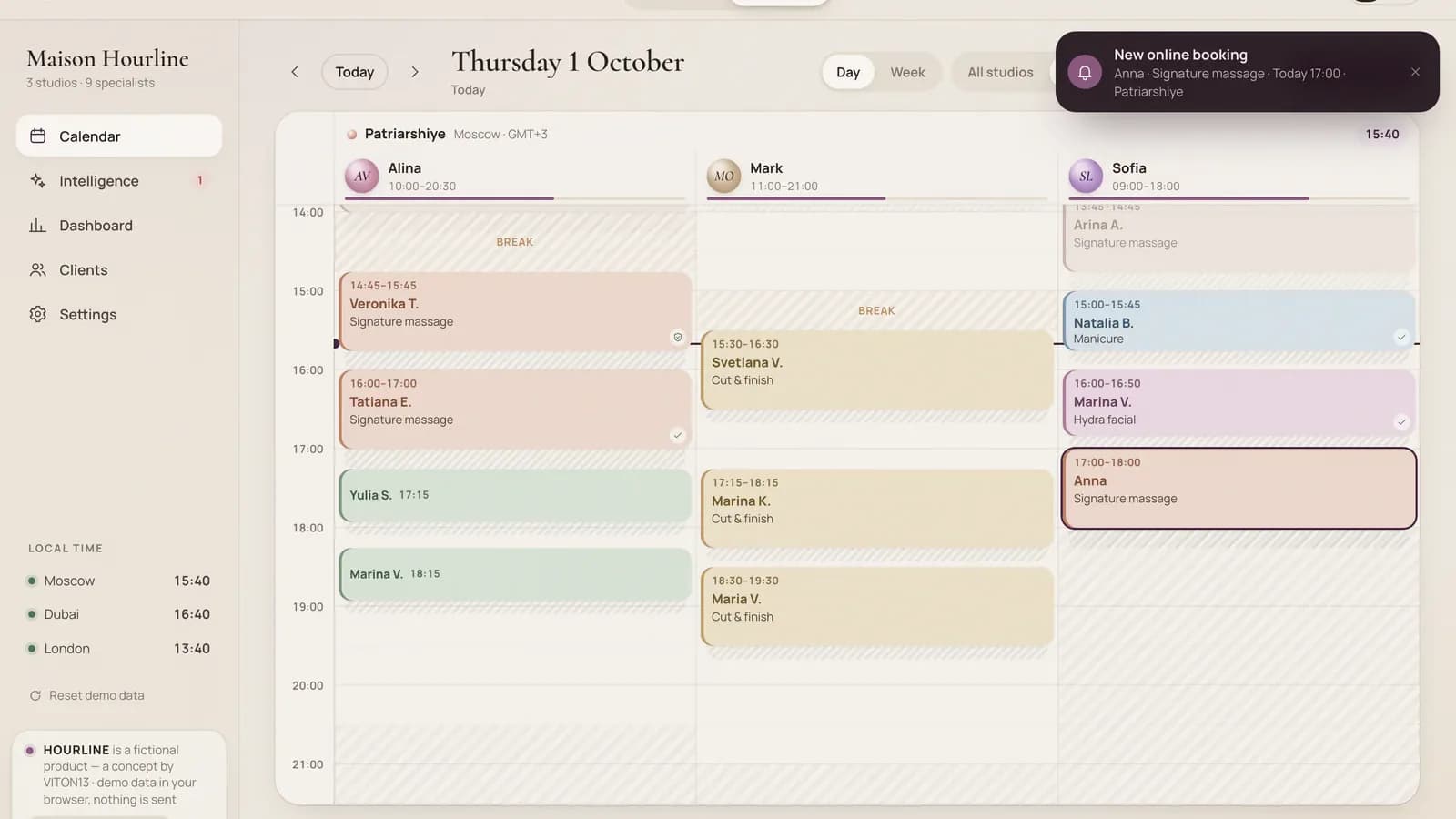
The studio side has five views. The calendar shows a column per specialist, grouped by studio, and a drop that breaks a rule shakes back with the reason, such as an overlap with another booking. The dashboard shows revenue, a utilisation heatmap, cancellations, no-shows and lead time, and changes in Settings reach the booking page at once. The Intelligence view, labelled demo AI, gives each upcoming visit a no-show risk from a naive Bayes model trained on the demo’s own history, adjusted by rules for a confirmed reminder or a paid deposit. It also matches free time with people on a simulated waitlist.
The figures come from 28 September 2026, measured in headless Chrome on a MacBook. A scripted booking on a 390 px phone screen took 6 seconds from the first tap to the confirmation, the median of 14 runs that ranged from 6 to 16 seconds. An independent check re-tested all 658 times the engine offered over ten days in three studios and found 0 conflicts. All the JavaScript and CSS weigh 95 KB gzipped, fonts not included.
What the HOURLINE demo does not prove about real bookings
The limits of HOURLINE belong in the story. Maison Hourline, its specialists, clients, prices and bookings are fictional and generated in the visitor’s browser: there is no client, no users, no real bookings, no traffic and no revenue. Reminders, deposit requests and waitlist offers are simulated, and no message, payment or personal data leaves the browser. The demo shows how screens and rules behave, not how real clients respond to them.
The demo AI is rules and statistics, not a language model, and it learns from invented history, so it proves nothing about predicting real no-shows. The 6 seconds come from a script tapping at a fixed pace, and no user testing was done. Every figure is a lab measurement on one machine on one day. A production version would still need a server with slot locking, payments, real reminders, accounts and data protection.
Preparing to choose a booking program or to order your own platform
Whatever you choose, prepare one sheet first. Put on it the services with durations and buffers, each specialist’s hours and services, the cancellation policy and where a deposit applies. Add the channels clients book through today, from the phone and messengers to maps. With that sheet any tool can be tested in an hour, because you know which rule to try to break.
Ready-made online booking services with free plans exist, and for one or two specialists, standard services and one location they are often enough; the provider’s own page says what the free plan limits. Off-the-shelf appointment scheduling software stops fitting in recognisable ways. Your rules do not fit its settings, you want booking under your own brand and domain, or it must exchange data with your accounting or CRM.
That is when a custom booking platform is worth discussing, and when a concept like HOURLINE serves as a reference rather than as proof. VITON13 Studio develops online booking platforms to order, from the client page to the back office. The linked guide explains what a website with online booking costs. Bring your sheet, and the conversation starts from your rules rather than from someone else’s demo.
Practical checklist
- List every service with its duration and the buffer it needs after the visit.
- Write down each specialist’s weekly hours, breaks and the services they perform.
- Decide the free cancellation window, the late fee and which services need a deposit.
- Ask the booking provider where its client database is stored and under what contract.
- Book a test visit on your own phone and time it from the first tap to the confirmation.
Questions and answers
Is a free online booking service enough for a small salon?
Often it is, when you have one location, a few specialists and standard services. Check the limits of the free plan on the provider’s own page, and move on when your rules, your brand or your integrations no longer fit what its settings allow.
Do booking reminders really reduce missed appointments?
In healthcare trials they did, on low to moderate quality evidence: the Cochrane review found higher attendance with text reminders than without, names patients’ forgetfulness as one of the main reasons for missed visits, and saw text messages cost less per attendance than calls in two studies. Count your own no-shows before and after switching reminders on.
Can clients book a visit straight from Google or Yandex maps?
Both platforms describe it in their help pages: Google Business Profile through a booking provider or your own link, Yandex Business through a booking button for certain types of activity. These are platform rules that change, so check the current help page for your category and country.
Does a client booking program fall under personal data law?
The program stores names and phone numbers, which 152-FZ in Russia and the GDPR in the EU treat as personal data. Consent wording, the storage location and retention periods depend on your case, so check them with a specialist in data protection law.
What did the HOURLINE concept show, and what did it not?
It showed a two-sided booking platform working in the browser on generated data, with every offered time re-checked without conflicts in a lab test. It did not show real clients, real bookings, no-show predictions or revenue, because there are none.