
Answer in brief
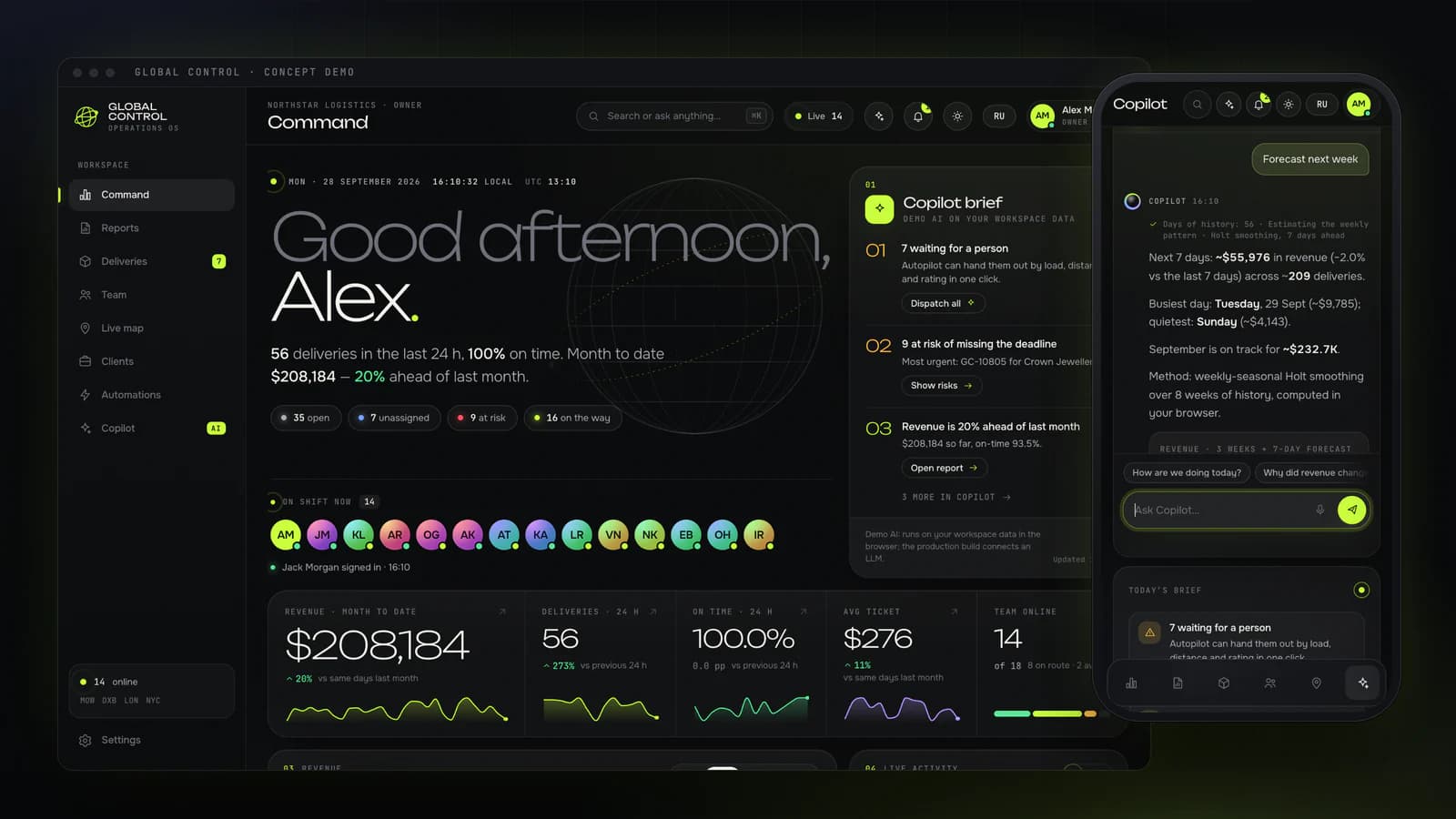
Global Control is a concept operations CRM by VITON13 Studio: nine modules in one browser app, including a dispatch board with AI dispatch, team registration, a live map, monthly and yearly reports and a copilot with 35 intents in English and Russian. It runs on generated data, and its AI is on-device rules and statistics, labelled as demo AI.
A CRM for teams that dispatch across cities
Most small companies meet the word CRM through a sales pipeline: leads, deals and follow-ups. Companies that deliver, repair or install for a living need a different kind of system, one that answers who is free, which order is late and how the month is going, in several cities at once. Global Control is VITON13 Studio’s concept of that kind of operations CRM, published in September 2026 and shown through Northstar Logistics, an invented delivery company with hubs in Moscow, Dubai, London and New York.
The brief was a premium CRM in which a manager registers employees, hands out orders, tracks them, reads indicators and charts, downloads monthly and yearly reports, gets a notification when someone signs in and works with an assistant that adapts to the person. It also had to be a demo a stranger can play with, so every visitor can click everything, create their own orders and people, and watch the company react.
A generated company for every visitor
The demo starts with an onboarding that asks for a name, a role (owner, manager or employee), a company name, an industry, a team size from 8 to 30, a currency and an accent colour. A seeded generator then builds the workspace. In the default demo that means 18 people in four hubs, 22 clients, about 400 orders over the last 14 days and six automations, with an older history behind them so that monthly and yearly reports always have data.
The answers change the product, not only the name on the screen. The industry changes the vocabulary everywhere, so a delivery firm sees couriers and deliveries while a service company sees technicians and jobs. The role changes the home screen: money and growth for an owner, the dispatch queue for a manager, the working day for an employee. A live simulation then signs people in and out, brings in new orders and moves couriers along their routes, each hub on its own local time.
Dispatch board with reasons behind every suggestion
Orders live on a board with drag and drop between statuses and onto people, and every card carries a ring that counts down to its promised time. Opening an order shows a drawer where AI dispatch ranks the team by hub, current load, distance, on-time rate and rating, and explains why the top candidate was chosen. A manager can accept the suggestion or drag the order to someone else.
The team module registers an employee in four steps and ends with a holographic badge that tilts under the pointer. A few seconds after the invitation the new person signs in, and the rest of the team gets a notification, which is simulated in the demo. The clients module gives every account a health score and shows what raised or lowered it, so the number can be checked rather than trusted.
Live map, reports and rules written in words
The live map draws a procedural city for each hub, with couriers moving through its streets, and a global view with the real line between day and night. Reports cover a month, a quarter or a year and download in three formats: a PDF drawn by the studio’s own minimal writer, a CSV that opens correctly in Excel in both languages, and JSON for anyone who wants the raw figures.
Automations run as flows of connected steps. The builder accepts a rule written in plain English or Russian, turns it into a trigger, conditions and actions, and replays it on the last 14 days to show how often it would have fired. This makes the logic of the system visible to a manager who will never open a settings file.
What the label “demo AI” means here
The copilot understands 35 intents in English and Russian, tolerates typos, extracts names, dates and places, answers with live numbers from the workspace and acts through the same functions a person uses, from dispatching the queue to exporting a report. The command palette opens with ⌘K, and a proactive layer offers a one-click fix for an order at risk at most every 45 seconds.
None of this is a language model, and the product says so on screen. The copilot, AI dispatch, the forecasts and the rule builder are on-device parsing, rules and statistics. The weekly forecast, for example, uses Holt’s method with a weekly seasonal pattern, a standard technique from time-series forecasting. The label matters: a buyer should know whether an assistant reasons over text or follows rules, because the two fail in different ways.
No framework, one store, one source of figures
Global Control is plain JavaScript and CSS bundled with esbuild into a static folder, so it runs from any address. Each view is its own lazily loaded file, 43 in all, and three.js loads only for the globe in the intro. One store holds the workspace and saves it in the browser’s localStorage; every change goes through a small set of actions that emit events, so the views, the simulation, the notifications, the automations and the copilot react to the same facts.
Every figure comes from one set of functions for indicators, series, the forecast and the dispatch score. That is why the dashboard, the reports, the exported files and the copilot’s answers always agree, which is the property a real operations team notices first when two screens of a system disagree.
The data comes from a seed, so the same onboarding answers always produce the same company. Detailed orders cover the last 14 days, a history generator fills older months with weekly and seasonal patterns, and each hub follows its own local working hours. The design is a dark control room with a day theme beside it, self-hosted fonts and one accent colour chosen by the visitor; people who ask their system for reduced motion get instant changes instead of animations.
Measurements from 28 September 2026
The interface has 2,045 strings in English and the same number in Russian, with none missing on either side. A scripted walk-through of 13 routes at desktop and phone widths, the three roles, the Russian interface, the onboarding and the main actions (AI dispatch, a new order, a registration through to the badge, six copilot questions, a rule written in words, PDF and CSV exports) ran with zero console errors, zero security-policy violations and zero failed requests. The monthly report came out as a valid three-page PDF.
The first script weighs 3.3 KB compressed, and all 43 script files with the stylesheet come to 573 KB compressed. On the live address Lighthouse gave performance 79 on a simulated phone and 97 on desktop, with accessibility and best practices at 100. The phone score is held back by the intro’s subtitle, which appears after a short preloader at 3.7 seconds.
Gaps between the concept and a production CRM
Northstar Logistics, its people, clients, orders and money are fictional and generated in the visitor’s browser. There is no client, no users, no real deliveries and no revenue, and invitations, messages and sign-ins are simulated. The demo proves how the studio designs and builds an operations tool, not how such a tool performs in a real company.
A production version would need a server and a database, accounts with roles and permissions, real notifications by email and messenger, integrations with telephony, maps and accounting, data protection that matches the countries involved, and testing with the people who will use it every day. The concept is a shared picture to start that project from, which is often the hardest part of commissioning custom software.
Practical checklist
- List the cities, teams and order types the CRM has to handle on day one.
- Write down the three numbers a manager checks first every morning.
- Decide which assistant features must be rules you can audit and which may use a language model.
- Name the systems the CRM must exchange data with: telephony, maps, accounting, messengers.
- Plan a test week with the dispatchers who will use the system before it replaces the old one.
Questions and answers
What is an operations CRM and how is it different from a sales CRM?
A sales CRM tracks leads and deals. An operations CRM like the Global Control concept tracks the work after the sale: who is on shift, which order goes to whom, what is late and how each city is performing.
Can I try the Global Control demo myself?
Yes. The concept runs at tarasovvitalii.com/demos/global-control/ in English and Russian. A short onboarding builds a fictional company for you, and nothing you enter leaves your browser.
Does Global Control use ChatGPT or another language model?
No. Its copilot, AI dispatch, forecasts and rule builder run on-device rules, parsing and statistics, and the product labels them as demo AI. A production version could connect a language model where that helps.
Which reports can the concept export?
Month, quarter and year reports download as a PDF from the studio’s own writer, as a CSV that opens correctly in Excel in English and Russian, and as JSON with the raw figures.
Is Global Control a finished product I can buy?
No. It is a concept with generated data and no server. It shows how VITON13 approaches operations software, and a real system would be built around your processes, data and integrations.