
Answer in brief
Search Console is a free Google service that shows how a site appears in Google Search: how often its pages were shown (impressions), how often people clicked (clicks), the ratio of the two (CTR) and the average topmost position. It counts visits from Google only, not sales, and it does not say why a number changed; for that you need dates, comparisons and your own records.
What Search Console is, and which tools it does not replace
Google Search Console is, in the words of Google's own help, a free service that helps you monitor, maintain and troubleshoot your site's presence in Google Search results. It shows the queries the site appeared for, the clicks it got, its indexing problems and the sites that link to it. It is also optional. Google's help states that you do not have to sign up for it to be included in search results.
It is not Google Analytics, which follows visitors after they arrive; Search Console describes the results page before the click. Google's page about Search Console data explains why the two never quite match, starting with the fact that Search Console often covers only a subset of a site's URLs. Nor does it cover other search engines. For Yandex the counterpart is Yandex Webmaster, whose help says it helps you understand how easily users find your site, with query statistics on positions, impressions, clicks and CTR.
Adding a site: a Domain property or a URL-prefix property
Before any numbers appear, Google needs proof that the site is yours. Its help page on adding a property describes two kinds. A Domain property, written as a bare name such as example.com, covers all subdomains, like m and www, and protocols such as http and https. It is verified by a DNS record, except on Google-hosted products such as Blogger, so you need access to the domain's DNS settings.
A URL-prefix property, such as https://example.com, includes only addresses with exactly that prefix, protocol included. It offers many verification methods, and a site that answers on both http and https needs one for each protocol. If you control the domain, a Domain property shows the whole picture. A URL-prefix property suits one section, such as a language folder.
Clicks, impressions, CTR and position as Google defines them
The Performance report puts four numbers above its chart. Clicks, in Google's help, are the times a user clicked through to your site from Google Search results; impressions are how many times your site appeared in those results. CTR is clicks divided by impressions, and average position is the average position of the topmost result from your site. Google's page on impressions, position and clicks adds the counting rules: in general an impression counts whenever a result appears on the current page of results, and clicking the same link again after returning is still one click.
Position is where most misreadings begin. For each query Search Console takes the topmost place any link to your site held. In Google's example, one query showing the site at 2, 4 and 6 counts as 2, another at 3, 5 and 9 counts as 3, and the average is 2.5. Being an average, it moves when the mix of queries changes even if no result moved, and the same page calls position a complex metric that can be misleading.
Slicing the Performance report by query, page, country and device
Under the chart sits a table grouped by the tab you pick: queries, pages, countries, devices, search appearance or dates. A filter at the top switches between web, image, video and news results. Chart and table totals can differ, Google's help warns, because the chart counts two results from one site for one query as a single impression. Its help on advanced filtering adds comparisons of two countries, two devices or two periods, one at a time.
Filtering by query or page can change the totals too, partly because of anonymized queries, which a Google Search Central blog post defines as queries not issued by more than a few dozen users over a two-to-three month period. Data also arrives late: Google's page about Search Console data says it is normally available in two to three days. For yearly patterns, Google's guide to debugging traffic drops suggests the Last 16 months filter. Anything older has to be stored yourself through the API or bulk exports.
One real report: a Bali tours website in five languages
A real report makes the definitions easier to hold. SB Excursions runs private tours in Bali; its website, designed and built by VITON13 Studio, is a real client project with a tour catalogue, tour pages with prices, an AI trip planner, a journal of guides and a direct enquiry in WhatsApp. Every page exists in English, Chinese, Russian, Spanish and French, part of the site also in German. On 25 September 2026 its sitemap held 2,061 URLs.
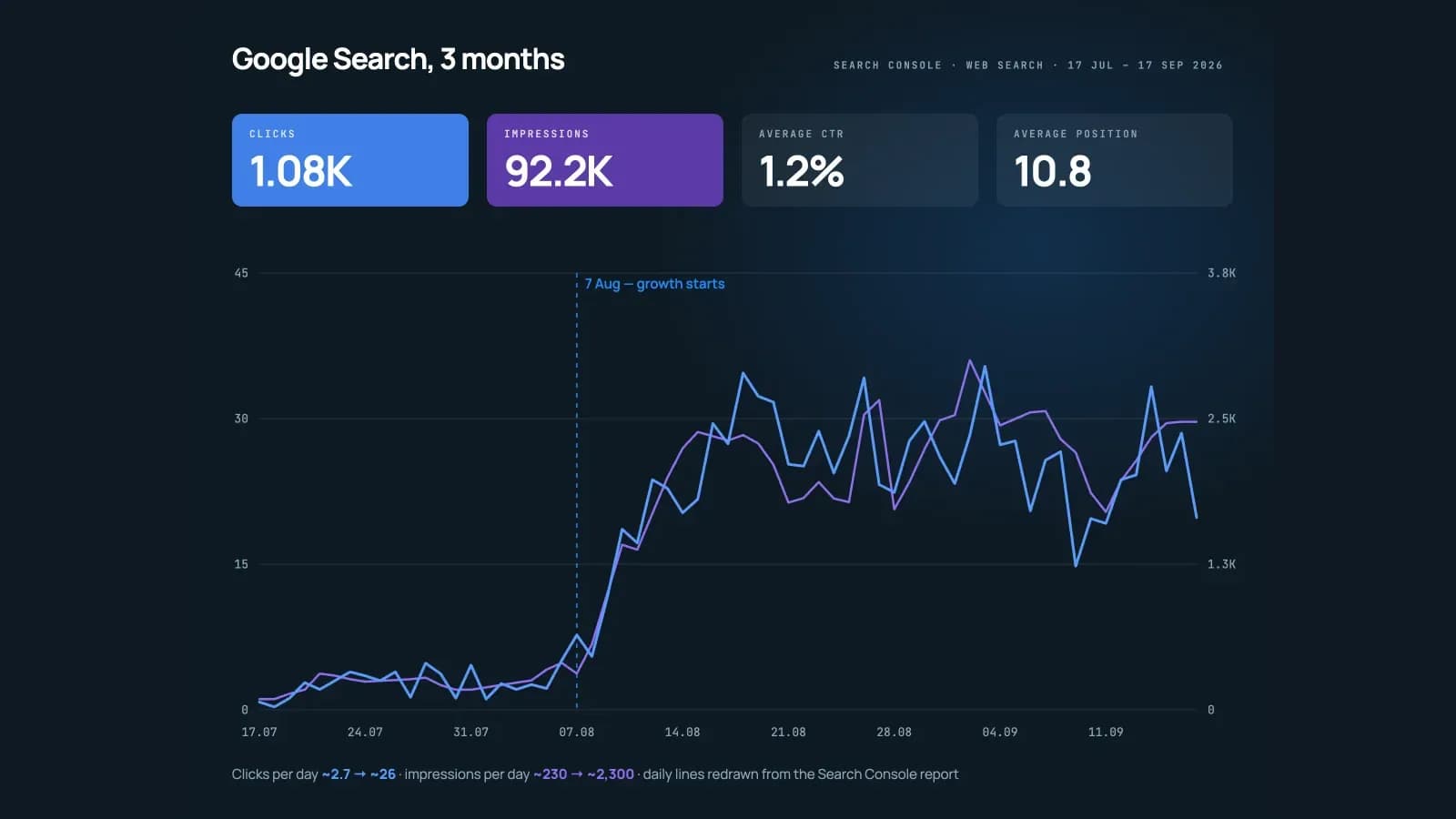
The owner's report for the three months to 17 September 2026 shows 1.08K clicks, 92.2K impressions, a 1.2% average CTR and an average position of 10.8, all from Google web search. The 1.2% is simply the first figure divided by the second. Position 10.8 averages the topmost places across every query the site was shown for. The case reads it plainly: many queries still show the site on the second page of results.
The daily chart around 7 August and what it leaves open
The daily chart tells another story. Until early August the site received about 2.7 clicks and 230 impressions a day. From 7 August both lines rose within a week and held: from 14 August to 17 September the average was about 26 clicks and 2,300 impressions a day, with a peak of about 35 clicks on 3 September. A three-month total folds two very different periods into one number.
What the chart cannot say is why. Search Console records that a rise happened and when, not its cause. The case names two things that may both have played a part, the indexing of the new language editions and the travel season, and claims neither as the reason. Crediting the rise to one edit, one release or one article would go beyond anything the report shows.
Nor does the report count money. Search Console counts visits from Google, not bookings or revenue, and here enquiries continue in WhatsApp. Conversion figures and the project budget are not published, so the case makes no claim about sales. A weakness is on record too: Lighthouse gives the home page 65 for mobile performance, with a largest contentful paint of 7.8 seconds.
Questions to put to any Search Console report from a contractor
The same questions fit any report a contractor sends. Which property and which search type: the whole domain or one folder, web or images. Which dates exactly, since a screenshot without a date range is a picture, not a report. Compared with what: Google's traffic-drop guide recommends setting the last three months against the previous period and against the same months a year earlier.
Then ask about cause and money. The same guide lists technical, security and spam issues, algorithmic updates and shifts in what people search for among the reasons traffic moves, and notes that industries differ in how seasonal they are. A report that credits growth to the work without ruling these out is telling a story. If it stops at clicks, ask where enquiries are counted, since Search Console sees nothing after the click.
What to set up in Search Console before you pay for SEO
Do the owner's part before ordering SEO. Verify a Domain property in Google Search Console yourself, so it stays yours whatever happens to the contract, and give the contractor access instead of your password. Google's help on users and permissions describes owners, who manage users and settings, full users, who see all data and can take some actions, and restricted users with simple view rights. When the work ends, remove the user; the page warns that a former owner whose verification token remains can verify again.
Then take a baseline: export the Performance report for the longest period available, with the dates in the file name. Google's help says the export holds both the chart and the table. The Search Central post on data limits caps an export from the interface at 1,000 rows. The SB Excursions figures are worth reading for that reason: they come with dates, a source and a stated boundary.
Reading the four numbers, checking a weekly comparison and spotting a page that lost clicks are owner's tasks. A technical audit, a structure for several languages or lifting pages off the second page is daily work for a specialist on staff or a studio such as VITON13. Whoever does it, ask for the report in this form: property, dates, comparison and a line on what it does not prove.
Practical checklist
- Verify a Domain property for your site yourself, through a DNS record where the domain is managed.
- Export the Performance report for the longest available period and put the dates in the file name.
- Add your contractor as a full or restricted user rather than sharing your Google account password.
- Compare the last three months with the previous period and with the same months one year earlier.
- Ask that every report names its property, search type, date range and what it cannot prove.
Questions and answers
Is Google Search Console free for a small business website?
Yes. Google describes it as a free service for monitoring and troubleshooting a site's presence in its search results. A site can appear in Google without it, but without a verified property the owner sees none of the queries, clicks or impressions.
Why do Search Console and Google Analytics give different visit numbers?
They measure different moments and filter differently. Google's help notes that Search Console often covers only part of a site's URLs and removes duplicates and robots, Analytics counts only browsers with JavaScript, and the Performance report uses California time for its days.
What does an average position around 10 or 11 mean in Search Console?
It is an average of the topmost place your site held for each query it was shown for. Some queries may be near the top and others far below, so the queries tab, sorted by clicks or impressions, says more than the single figure does.
How far back does Search Console keep Performance report data?
Google's guide to debugging traffic drops works with a Last 16 months filter and says that keeping more history means storing it yourself through the Search Analytics API or bulk data exports. New data normally shows up after two to three days.
Should an SEO contractor get owner access to my Search Console property?
Usually a full user is enough: Google's help says full users can view all data and take some actions, while owners also manage users and settings. Keep ownership yourself and remove the contractor's access when the work is finished.