
Answer in brief
An Instagram carousel is one feed post with several photos or videos that people swipe through. Instagram’s Help Center allows up to 20 items, one orientation for all of them and photos up to 1080 pixels wide. Plan one idea per carousel: a first slide that names the promise, one point per slide and a last slide with the next step, all in one grid and one type scale.
What an Instagram carousel is and what Instagram allows in one post
A carousel is a single feed post that holds several photos or videos, which people swipe through one after another. Businesses use it where one picture is not enough: a short lesson, a before and after, a case told step by step. Anyone asking how to make an instagram carousel needs three answers: what the platform allows, how to plan the slides and how to keep a dozen carousels in one style.
The limits come from Instagram’s Help Center and change over time, so read them as written today. Its page on sharing several photos or videos says a carousel holds up to 20 items, and the orientation you choose, square, portrait or landscape, applies to all of them. In the feed people see the first item with a row of dots below it; on the profile only the first item appears, marked by a multi-photo icon. Videos inside a carousel are not treated as reels and do not show up in the Reels tab.
Planning carousel slides: one idea, one promise, one next step
A carousel works when it carries one idea from start to finish. Since the profile shows only the first item, the cover slide must name the promise of the whole post on its own: what the reader will know after the last swipe. Each following slide makes one point that can be read at a glance, and the last one says what to do next. Write the slide texts as a list before designing. If one point needs two slides, the idea is probably two carousels.
Two more rules from the Help Center shape the plan. A carousel has one caption for the whole post, so the slides carry their own words and the caption only adds context. After sharing, Instagram lets you reorder or remove photos and videos and edit the caption, location and tags, but not add new items. A forgotten slide means deleting the post and publishing it again, so the set is checked before posting.
Carousel slide size, aspect ratio and safe margins
Instagram’s Help Center page on image resolution gives the numbers to design for. A photo between 320 and 1080 pixels wide keeps its original resolution as long as its aspect ratio sits between 1.91:1, a wide landscape, and 3:4, a tall portrait. Other shapes are cropped to fit a supported ratio. A narrower file is enlarged to 320 pixels and a wider one sized down to 1080. The page recommends uploading at least 1080 pixels wide.
For a lesson carousel this usually means a portrait slide 1080 pixels wide, since 3:4 is the tallest shape the page lists and a tall slide fills more of a phone screen than a square one. Because orientation is one choice for the whole post, a square image placed among portrait slides is cropped to the shared frame. Fix that frame before the first sketch.
Keep a safe margin. A headline, a figure or a logo should never touch the edges, because any crop takes the edges first, whether Instagram, a scheduling tool or a repost makes it. The text has to be readable on a phone held in one hand, so the type is large and the words are few. A quick test is to shrink the slide to thumbnail size: if the main line cannot be read there, it is too small or too long.
Contrast, type size and alt text on carousel slides
Text slides fail on contrast more often than on taste. The W3C’s explanation of WCAG success criterion 1.4.3, Contrast (Minimum), asks for a contrast ratio of at least 4.5:1 between text and background, and 3:1 for large-scale text, which it defines as at least 18 point, or 14 point bold. People with low vision, it explains, struggle with text that blends into its background. A line set over a busy or blurred photo breaks first, so measure it with a contrast checker.
Alt text is the second layer. Instagram’s Help Center describes automatic alt text, which uses object recognition to describe photos for people with visual impairments, and a field where you write your own description before sharing or later through Edit. The description is read only to people using a screen reader. When a slide is mostly words, put those words into the alt text, so a listener gets the lesson rather than a description of a coloured rectangle.
Design templates or code: one visual system for a carousel series
Slides are produced in two ways. A design template fixes the grid, fonts and colours in one file, and each new carousel is a copy with new words; a price that changes then has to be corrected in every copy by hand. The other way treats slides as code: each carousel is a web page with one section per slide and a shared style sheet, and a browser running without a window renders every section to an image. That route needs someone who maintains HTML and CSS, so it pays off for a series. Either way the system is one grid, one type scale and one colour logic.
A series often travels beyond Instagram. In Telegram the nearest format is an album: the Telegram blog post that introduced albums in November 2017, with version 4.5, says each album can include up to 10 photos or videos, arrives as one notification instead of ten and lets the sender control the order. That figure dates from 2017, so check it in the current app.
The VITON13 case: ten studio carousels laid out as HTML pages
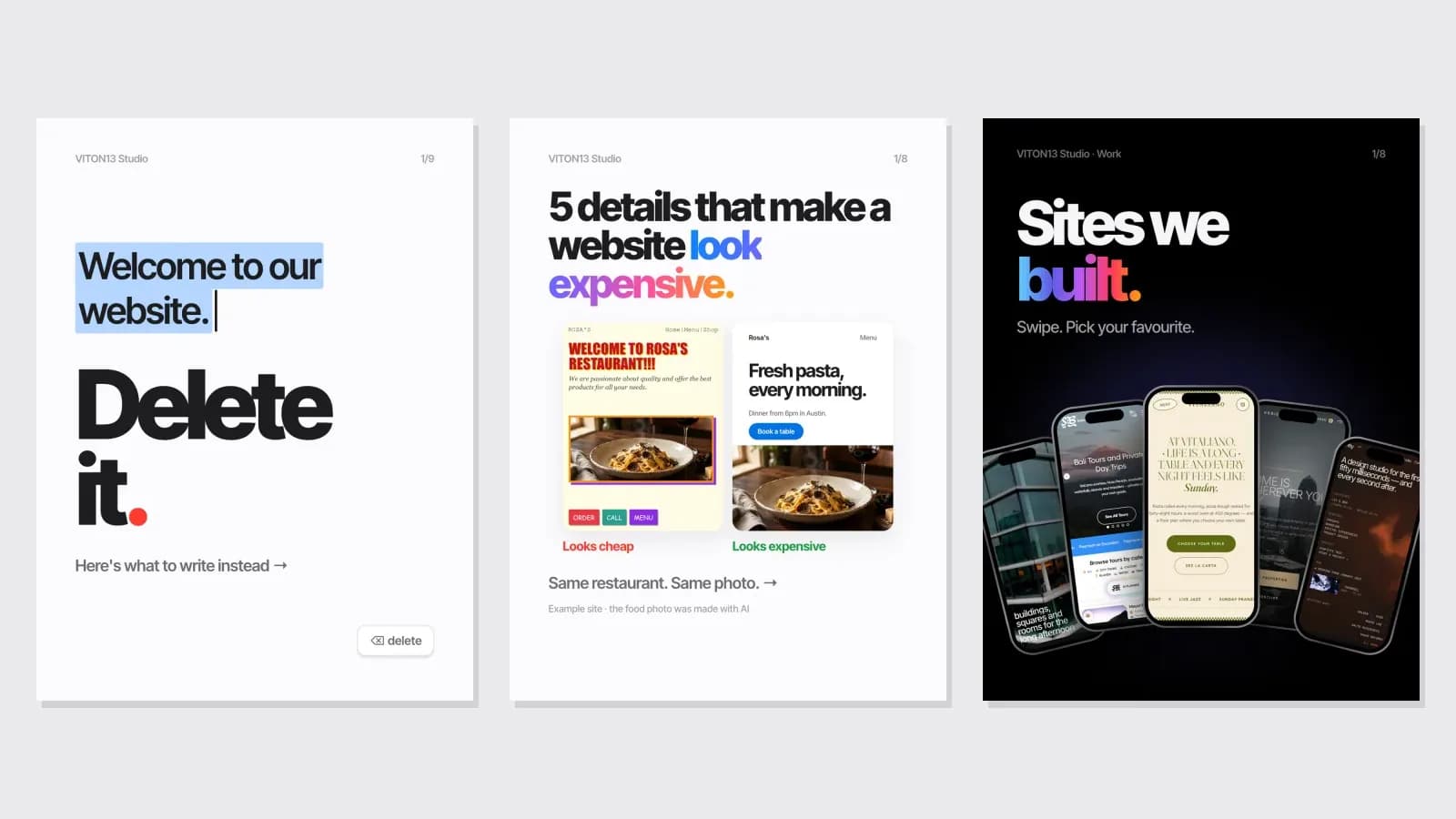
One case shows the code route at work, and it is the studio’s own work, not a client commission. VITON13 Studio made ten carousels for @viton13company, its English-language Instagram account for clients in the US. Six are white lessons about websites, three are dark posts that show proof, and an earlier one, “0.05 seconds”, has its own dark-green look. Together they hold 83 slides.
Every carousel is an HTML page with one section per slide. Headless Chrome, driven by Puppeteer, renders each slide to a 1080×1440 PNG for posting from the app and cuts a 1080×1350 centre crop for schedulers, so nothing important sits outside the 4:5 area. The white six share one style sheet: one idea per slide, large type, a single gradient accent word and a blue button for direct messages. The dark three share another, with device mock-ups built from real screenshots of the sites.
The gain is in corrections: a price or a word changes in the source, not in a design file. The white six were rendered on the morning of 26 September 2026 in about twelve minutes, and the dark three that evening. Every outside figure carries its source on the slide. Each carousel ends with one ask: a single word to send in a direct message.
What the carousel case does not prove, and the flaws it admits
The case shows a production method, not a result. These are VITON13’s own posts for its own account. On 27 September 2026 nine of the carousels were scheduled, one a day from 29 September to 7 October 2026, and not yet published, so the case holds no reach, like, save or enquiry data and claims none. The only client shown is SB Excursions: one dark carousel redraws its daily Google clicks from the owner’s Search Console report, and its slides say that clicks are not bookings.
The case also lists its own mistakes. One label on “Sites we built.” marks VITON13 Medicine as the studio’s own product, although it is a concept site. On the Vitaliano slide the top line almost disappears into the blurred background, the contrast problem described above. AI is labelled where it was found, including an AI-generated pasta photo for a made-up restaurant, and “Sites we built.” carries Instagram’s AI label as a precaution, though no AI image was found in the sites it shows. Instagram’s page on labelling AI content says Meta requires a label on photorealistic video and realistic-sounding audio but not on images made with AI, so labelling a still picture is a choice of honesty.
Preparing a carousel series yourself or ordering the design
Whoever makes the slides, the material comes from the business. Prepare a list of topics, one idea per carousel, each written as the promise of its first slide. Collect the facts every lesson relies on together with their sources, because a figure without a source is a claim nobody can check. Add the brand colours as exact values, sharp logo files, licensed fonts and photos you own.
Making carousels yourself makes sense when posts are occasional and the design is simple, and the steps of how to make an instagram carousel are no secret. Ordering makes sense when the account needs a regular series, several formats from one source, or checks you have no time for. One kind of order is a content design system: the grid, type scale and templates or code your team then uses. The other is ongoing management, where someone also plans, writes and publishes the series. VITON13 Studio does both kinds of work; prices and terms sit on the linked guide and service pages.
Practical checklist
- Write down the one idea of the carousel and the promise its first slide will make.
- Choose one orientation for the whole post and export every slide 1080 pixels wide.
- Measure text contrast against the WCAG minimum of 4.5:1 and keep key words away from the edges.
- Write your own alt text instead of the automatic one, and include the words your text slides carry.
- Save the template or style sheet so the next carousel reuses the same grid, type and colours.
Questions and answers
How many slides can one Instagram carousel hold?
Instagram’s Help Center currently says up to 20 photos and videos per carousel. Longer is not better: a lesson that needs eight slides should not be stretched to twenty, because every extra swipe is another chance for the reader to stop.
Which size should Instagram carousel slides be?
Export them at least 1080 pixels wide. Instagram’s resolution page keeps a photo’s original quality when its ratio is between 1.91:1 and 3:4 and crops shapes outside that range. Every slide of one post shares the orientation you pick, so fix it before designing.
Can a slide be added to an Instagram carousel after posting?
No. According to Instagram’s Help Center, a shared carousel can have its items reordered or removed and its caption, location and tags edited, but new photos or videos cannot be added. Adding a slide means deleting the post and publishing it again.
Do videos inside an Instagram carousel count as Reels?
Instagram’s Help Center says they do not: carousel videos are not shown in the Reels tab and have no reels features. If a clip should be found as a reel, publish it as a reel and keep the carousel for the step-by-step explanation.
Can the same carousel be posted to a Telegram channel?
As an album, within Telegram’s own limit. The Telegram blog post that introduced albums in 2017 gives up to 10 photos or videos per album, so a longer Instagram carousel has to be shortened or split before it goes to a channel. Check the current limit in the app.