
Answer in brief
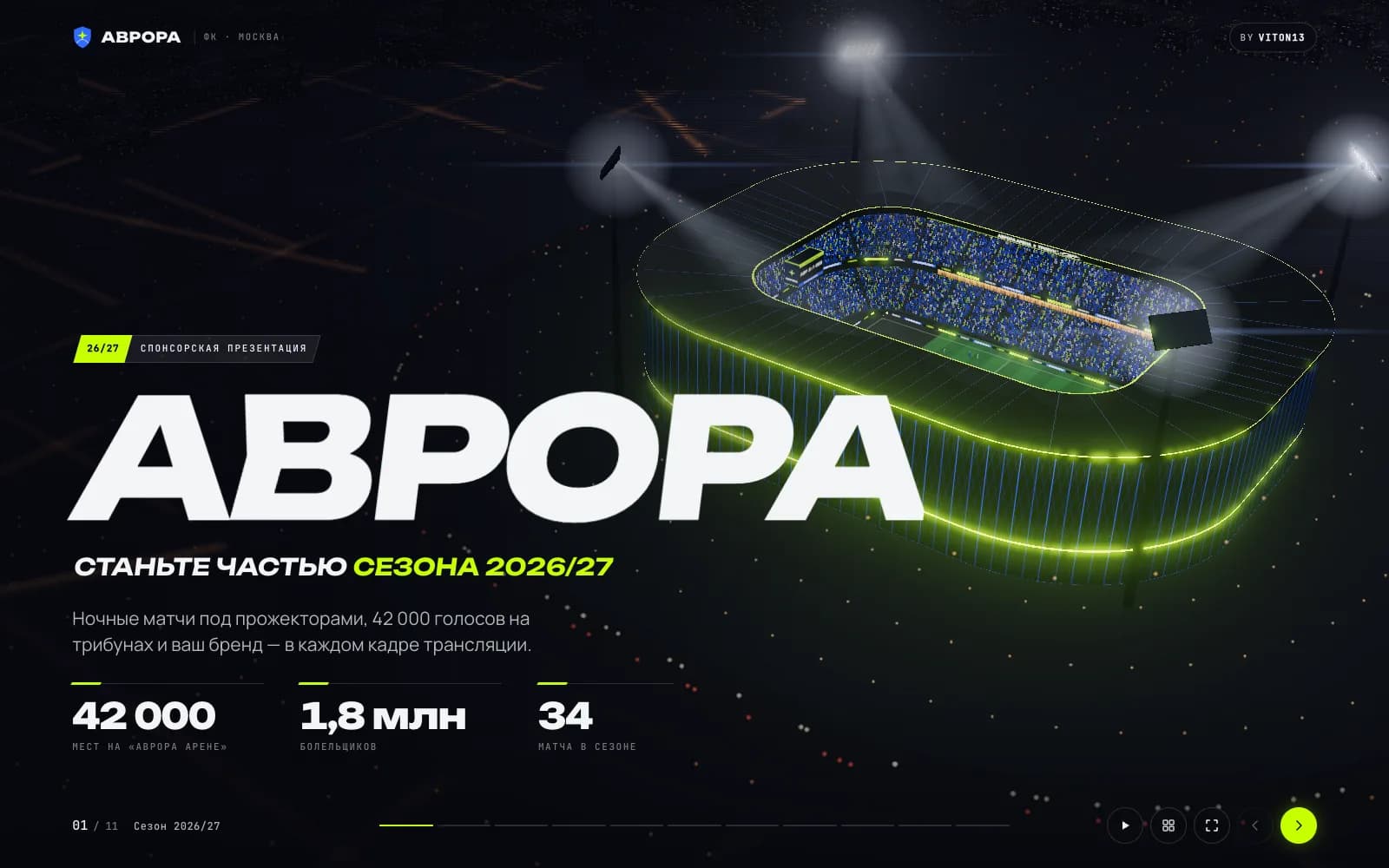
A 3D web presentation is a deck that runs in the browser: readable HTML slides sit over a live three.js scene, and every slide moves the camera to its own shot. VITON13’s seven concept decks hold 78 slides, load 235–252 KB of gzipped JavaScript each, held 60 fps on an Apple M5 MacBook and export to a 16:9 PDF for email.
Seven concept decks on one engine
In September 2026 VITON13 Studio added a set of seven presentation concepts to its portfolio. Each is built for a job clients bring to a studio again and again: the Avrora football club selling a sponsorship package, the NEXORA logistics start-up raising a Series A round, the launch of the NOVA smart ring, homes in the NORD 81 residential tower, the ORBITA space company, partner packages for the PULSE 2027 festival and the HELIX genomic clinic. Every brand, figure, name and phone number in them is invented, and the last slide of each deck says so.
Together they hold 78 slides in Russian: twelve in the investor pitch and eleven in each of the other six. A hub page lists the decks with their slide count, their transition and a PDF download. All seven run at tarasovvitalii.com/demos/presentations/, the portfolio of the studio’s founder, and the studio documents them as a case study with its screens and measurements.
Slides that fly the camera instead of cutting
A 3D web presentation in this set is a web page with two layers. At the back is a live three.js scene: a night stadium, a glass tower, a satellite over the Earth. In front are ordinary HTML slides with headlines, figures and charts. Every slide owns a camera station in the scene, so when the presenter moves on, the camera flies to the next shot while the text changes on top of it.
Slides change with one of seven 3D transitions picked for the brand: a sprint with speed streaks for the football club, a rotating cube for the investment pitch, a fly-through for the ring, a turning book page for the residence, an orbit for the space company, a glitch flip for the festival and a soft rise for the clinic. Numbers count up when a slide opens, bar charts grow and small 3D callouts pin themselves to parts of the scene.
Because the text stays HTML, it can be selected, copied and read by a screen reader, and it stays sharp on any display. That is the main difference from a video or an animated export, where every word becomes pixels.
Scenes generated in code rather than stock footage
None of the seven decks uses a downloaded 3D model, a photo or a video. The stadium is built from about 43,000 seats and fans, the NORD 81 tower grows floor by floor on the construction slide, the ring comes apart into six labelled parts and the Earth under the ORBITA satellite is generated with shaders. Repeated objects such as seats and windows are drawn with three.js InstancedMesh, which renders many copies of one object in a single draw call, and bloom is the only post-effect.
Generating the scenes keeps the files small and lets a slide change the scene itself: lights come on, a crowd moves to 124 BPM, a helix changes material. It also means nothing in a deck is a licensed image that could expire or need a credit line.
Presenter controls borrowed from slide software
A deck has to survive a meeting room, so the engine keeps the habits people already have. The arrow keys, the space bar, PageDown and PageUp move between slides, which is what most presentation clickers send; the mouse wheel and a swipe do the same. The O key opens an overview of every slide as tilted cards on a 3D grid, F switches to full screen and A starts autoplay.
Every slide has its own address, so a sales manager can send a link that opens on slide five. On phones the scene stays at the top of the screen and the slide text moves into a scrolling panel underneath, so long slides remain readable on a narrow screen. A separate script renders each deck to a 16:9 PDF, which covers email attachments, printing and anyone who opens the deck on a machine that struggles with 3D.
Weight and frame-rate figures from 28 September 2026
On 28 September 2026 the studio counted frames with requestAnimationFrame, the browser call that runs once per screen refresh, for three seconds on two slides of every deck. The test ran in headless Chrome on a MacBook with an Apple M5 chip, in a 1600 × 1000 window on a Retina scale. All 14 readings came out at 60 fps, between 60.1 and 60.2.
Each deck loads between 235 and 252 KB of JavaScript with gzip compression, three.js and GSAP included. The whole build weighs 27 MB, and 14 MB of that are the seven PDF versions, which a visitor downloads only on request. These are lab figures from one recent machine: they say nothing about an old office laptop or a budget phone, which were not measured.
When a browser deck beats a PDF, and when it loses
A browser deck earns its cost when the presentation is sent as a link and opened on a decent screen: a sponsorship offer that has to feel like match night, a residential project where the building is the product, a pitch where a chart that grows is easier to follow than a static one. It also helps when the same deck is presented live and then forwarded, because the recipient sees exactly what the room saw.
It loses when the deck will mostly be printed, read on an old computer, edited by several people in a slide tool or opened without an internet connection. In those cases the PDF copy carries the content, and a classic slide file may simply be the better choice. The honest question to ask before ordering one is where the deck will actually be opened.
There is also a middle path. A company can keep its usual slide file for internal editing and commission a 3D web presentation only for the version that goes out to sponsors, investors or buyers. The web deck then becomes the polished edition of a story that is already agreed, which keeps the expensive part of the work short and avoids rebuilding scenes every time a figure changes in the spreadsheet.
Limits of the concept set
The seven decks are a concept that shows a format, not client work. The football club, the start-up, the ring, the tower, the space company, the festival and the clinic do not exist, so the set proves nothing about rounds raised, sponsorships sold or flats reserved. The decks are in Russian only, and the demo is kept out of search on purpose so that the case page, not the demo, is what people find.
The frame rate was measured on one machine on one day. A real project would add testing on the devices the audience actually uses, a lighter mode for weak graphics chips and the client’s own figures in place of invented ones.
Material to gather before commissioning a 3D deck
The scene is the most visible part of such a deck, but the slides still carry the argument. The work goes faster when the client arrives with the story already in order: the one sentence the audience should remember, the five to seven numbers that prove it, the logo files and colours, and an idea of the object the scene should show, whether that is a building, a product, a venue or a route on a map.
It also helps to decide early who presents the deck and where. A deck shown from a laptop on a projector, a deck sent to investors by email and a deck opened on a phone at an event need different amounts of text per slide and a different balance between the scene and the words.
Practical checklist
- Write down where the deck will be opened most: a projector, an email inbox or a phone.
- Collect the five to seven figures the deck must prove and the source of each one.
- Choose the single object the 3D scene should show: a venue, a building, a product or a route.
- Ask for a PDF version of every deck for printing, attachments and slow computers.
- Test the deck on the oldest device your audience is likely to use before sending the link.
Questions and answers
Can a 3D web presentation still be sent as a PDF?
Yes. In the VITON13 set a script renders every deck to a 16:9 PDF, so the same slides can go out as an attachment, be printed or be opened on a machine that struggles with 3D, while the link keeps the live version.
Does a three.js presentation work on a phone?
The decks have a phone layout: the scene stays at the top and the slide text moves into a scrolling panel below it. Frame rates were measured only on an Apple M5 MacBook, so performance on older phones is untested.
Were 3D models or stock videos used in the seven decks?
No. The stadium, the tower, the ring, the satellite, the stage and the DNA helix are generated in code, and the decks contain no photos or videos. Repeated objects such as seats and windows are drawn with instancing to keep them light.
How do I present one of these decks in a meeting?
Open the link in full screen with the F key and move with the arrow keys, the space bar or a clicker that sends PageDown and PageUp. The O key shows every slide at once, and each slide has its own address for sending a direct link.
Are Avrora, NEXORA and the other brands real companies?
No. All seven brands, their numbers, prices, people and phone numbers are fictional and exist only to show the format; the closing slide of each deck states this, and the studio labels the set as a concept.